Aim Assist / Silent Aim

1: Aim Assist
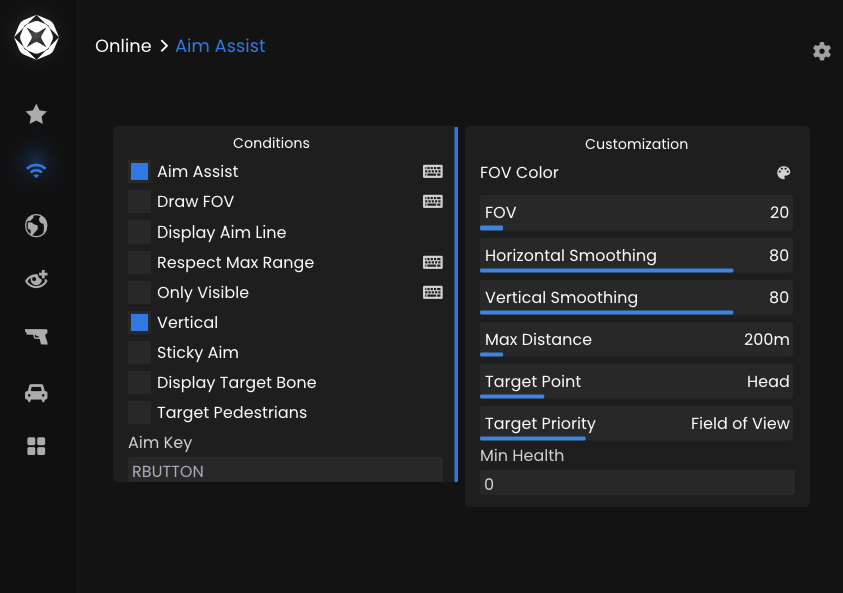
Aim Assist assists your aim by smoothly locking onto enemy targets. When configured correctly, it looks natural and is very hard to detect.
1.1: Recommended Aim Assist Settings
Navigate to the Online tab then click on Aim Assist and apply the following settings:
- Aim Assist: ON
- Only Visible: ON
- Vertical: ON
- Aim Key: RBUTTON (Right Click)
- FOV: 25-50
- Horizontal Smoothing: 80 (Higher = more legit)
- Vertical Smoothing: 80 (Higher = more legit)
- Target Point: Closest Bone
- Target Priority: Field of View
- Min Health: 0
All settigns not mentioned here are left on default. These values provide a strong advantage against legit players while remaining low-risk. It is important to not forget to set the Aim Key.
2: Silent Aim
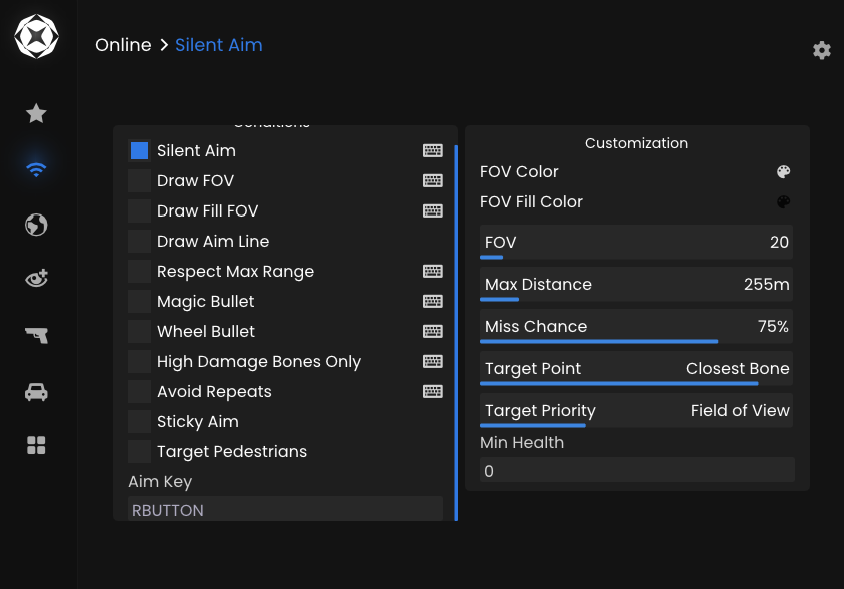
Silent Aim redirects bullets to the target without moving your crosshair. IMPORTANT: Silent Aim is more detectable if abused.
2.1: Recommended Silent Aim Settings
Go to the Rage or Combat tab (depending on version):
- Silent Aim: ON
- Aim Key: RBUTTON (Right Click)
- FOV: 20-40
- Miss Chance: 35-75% (Higher = more legit)
- Target Point: Closest Bone
- Target Priority: Field of View
- Min Health: 0
Avoid using low miss chance values to prevent suspicious behavior.
3. Best Usage Tips
- Do NOT enable Aimbot and Silent Aim at the same time
- Use Silent Aim only in short fights
- Combine with low FOV for best results
- Avoid snapping or instant locking